
Monthly Audit of built-in amendments on adjustable rate loans scheduled for the current month.
A re-review of built-in amendments on adjustable rate loans that implemented in the previous month
Department and Access
- Primary Department Supported: Product Support Audit
- Super Powers Needed: No
- Dev Support Needed: No
Context / Purpose
Use this process to confirm that built-in amendments on adjustable rate loans, whether scheduled for implementation or already implemented, have the correct Interest Rate History entries and correct fee calculations or applied fees.
The Re-review of previous month amendments will catch any that have implemented incorrectly.
Instructions:
1. Create HubSpot Ticket for external communications and tracking
- Ticket Name should be Monthly Audit of Amendments (Rate Changes & Fees) - [previous month name]
2. Export all the Amendments scheduled for the current month
From LMS Menu
-
Select Servicing
-
Select Amendments
- Filter by Loan Phase "Servicing"
-
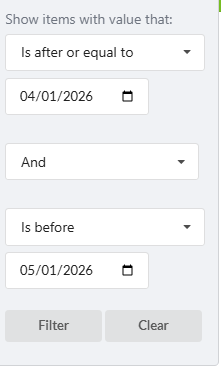
Filter by Amendment Date for the current month: Is After or Equal to "First Day of current the month" AND Is Before First Day of the next month
-
Filter by Amendment type - "Built In"
-
Filter by Is Rate Changing "YES"
-
Filter by amendment status - Does not contain "declined"
- Export to Excel
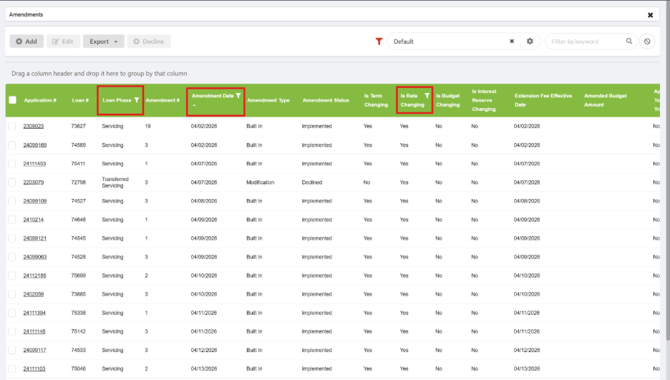
3. Review the interest rate history table on the Servicing Tab to determine if the new margin/rate has been added as expected
- From the excel, copy the loan numbers into LMS
If it's been added:
- Verify that the servicing tab's main page is also updated properly.
If it's missing:
-
Is there an active PAQ for that loan number? If yes, skip for now and note it in the spreadsheet.
-
After all loans are reviewed, send the list to the Servicing Account Managers for guidance. (Jennie Drake, Sam Drake and Tori McGaha) - Servicing will review and provide notes as a whole and return.
-
Once Servicing or provides their notes/ instructions, make any requested corrections and add the records to the Interest Rate History table to prepare each amendment for implementation.
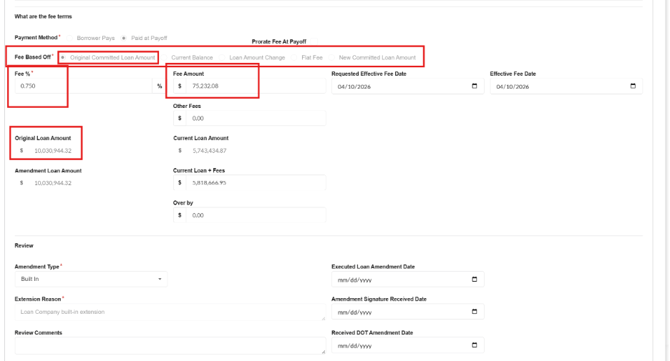
4. Review the ‘fee percent’ column to determine if fees should be charged
- For Amendments in Executed status:
- The fee will be auto-charged on the date of the amendment, so there will not yet be an associated fee in the loan history. Click into the Amendment & verify the fee amount (calculated correctly) based on the chosen options & loan amount.
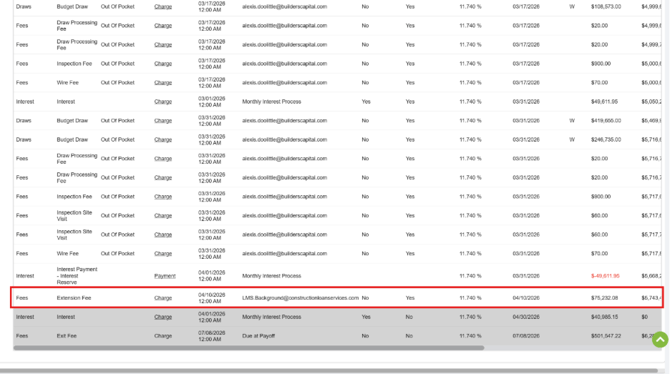
- For Amendments in Implemented status:
- Verify the fee amount based on the options chosen in the amendment & the loan amount in the amendment:
- Verify the fee was added to the loan history and matches the info in the amendment
5. Re-Review the Amendments that implemented in the previous month
- Using the spreadsheet from the previous month's audit and open each loan on the Servicing Tab:
- View Interest Rate History Table - There should be no fixed rate entries in the table for the amendment
- Servicing Tab details - Current Margin should match the amendment and interest rate history table table.
- Any Amendments that don't appear to have implemented correctly will need reviewed and corrected. Send the list to the Servicing Account Managers for guidance. (Jennie Drake, Sam Drake and Tori McGaha)
6. Notate Results of Audit:
- Notate the Results of the audit in the log provided in this document – Include any relevant notes comments and links to tickets
- Post a verbal the confirmation of audit’s completion in the Teams Chat
- Resolve HubSpot Ticket - Include all relevant notes screenshots and resolution summaries
AUDIT LOG – Notate the results of the audit here; include links to any ticket or tasks created
|
Date |
Results |
Tickets/Tasks/Resolution Notes |
Completed By |
|
4/22/26 |
74115 is frozen. All other updates have been made (16 total) |
|
CS |
|
6/5/26 |
Audit of all built In amendments on adj rate loans scheduled in June: 28 Total Amendments missing a record from the Interest Rate History Table - 4 loans directly affected and corrected (margins/rate changes). |
CZ |
|
|
|
|
|
|
|
|
|
|
|
|
|
|
|
|
|
|
|
|
|
|
|
|
|
|
|
|
|
|
|
|
|
|
|
|
|
|
|
|
|