Primary Department Supported: Accounting
Description: Instructions for reviewing requests that involve voiding interest reserve payments, and how to send to developers
Super Powers Needed? - NO
Developer Support Needed? - YES
Common Situations
Not seen often but occasionally a request is made to void an Interest Reserve Payment
-
Interest Reserve was utilized when it shouldn't have been
-
System Error or User Error resulted in a duplicate payment
Important Considerations & Best Practices
- Confirm the following with the ticket requester and add accounting and treasury to the email:
- Should all or part of the funds from the void be added back to the Current Interest Reserve Balance?
- Is there a need or plan to post another IR payment to replace the voided one
- For Requests coming from outside the accounting department:
- Always loop in accounting and treasury for visibility so they can review and confirm information
- Requests to void any payments posted in previous day or month: Get approval from accounting leadership (Helen Yoon, Richa Pandey, Megan McKell, Lisa Aplin) and treasury leadership (Lisa Kraynak) before proceeding
Instructions
To have an interest Reserve Payment Voided: Submit a task to the developers with:
Asana Task Guidelines:
-
Task Name (should match the name of the HubSpot Ticket): An easy way to name the ticket for identification (include loan number or numbers when applicable)
- Tip: Change the Name of the HubSpot Ticket before marking it for Dev Support
-
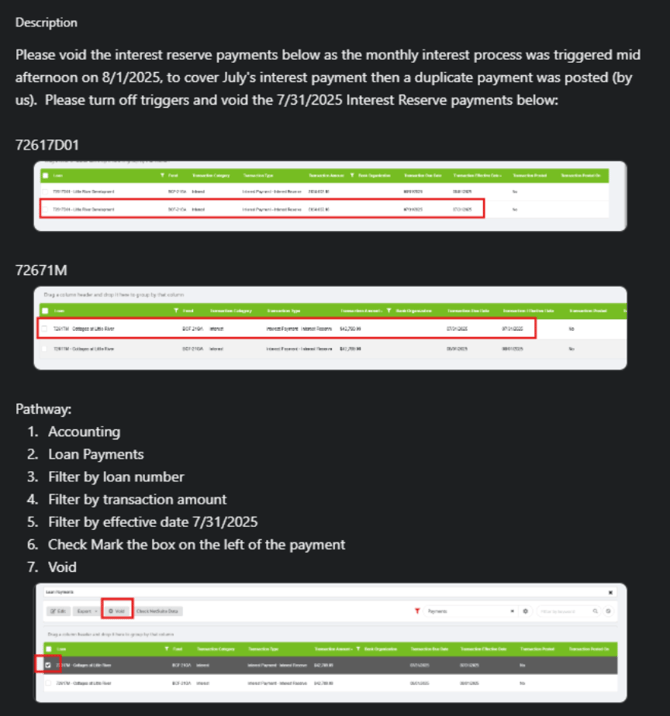
Developer Description: Where/What: Specific instructions ask the developer for exactly what is needed and should always include screenshots of exactly what items you are referring to
-
Repro/Pathaway: Step by step instructions for the developers to get to the section in LMS where the changes are to be completed.
NOTE: There should always be URLs included in the description or in the Repro/Pathway that direct the developers to the correct location in LMS