Primary Department Supported: Servicing
Description: How to update the percentage complete listed within Requested Draws in LMS
Super Powers? NO
Developer Support? NO
Common Situations
Servicing commonly requests updates to the percentage complete on specific construction budget line items within a draw request
Important Considerations & Best Practices
- Draws can only be updated in Requested or Revised Status
- Treat with urgency - These corrections directly impact a draw’s ability to fund
- Before updating: You need to have or request from Servicing
- A copy of the inspection report, or
- A clear screenshot of the report showing the correct line item and percentage.
- If not provided pull the report from the documents tab to verify the inspection report matches the ticket request
- DO NOT Update lines labeled Contingency Profit and Overhead: These lines are calculated values that require additional review at the budget level of the loan and developer intervention
Instructions:
To update the Inspection Percentage in A Draw:
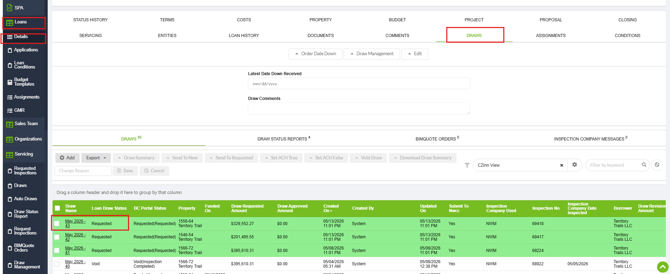
From LMS Menu Select:
-
Loans
-
Loan Details
-
Open Loan Details and Select the Draws Tab
-
Click the Draw Name to open the draw details.
-
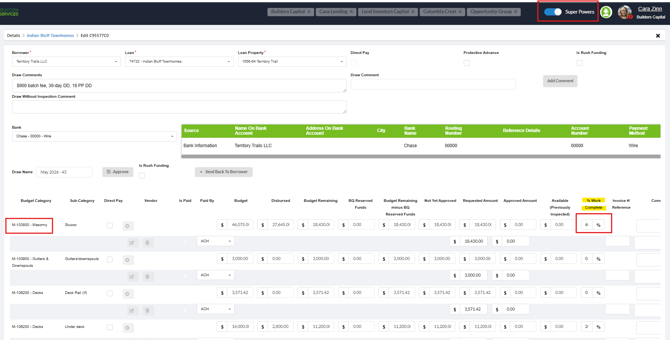
Locate the specific line item and the column labeled % Work Complete.
-
Enter the correct inspection percentage exactly as shown on the report.
-
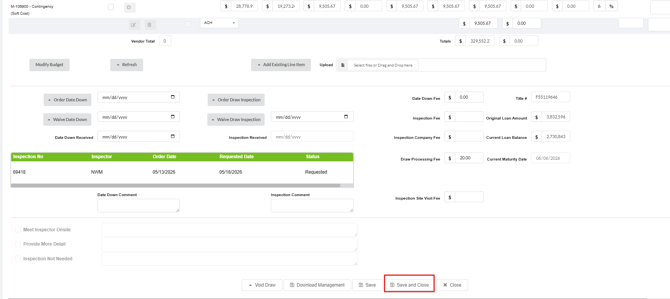
Select Save & Close