
Primary Department Supported: Accounting/ Treasury
Description: How and when to update the Current Interest Reserve field on the Servicing Tab in LMS
Super Powers Needed? - YES
Developer Support Needed? - NO
Context and Common Situations
- A ticket requester specifically asks for the Current Interest Reserve Balance to be updated
- Developers have manually posted interest reserve payments at Product Support’s request.
- Requests to post an interest reserve payment
- True-Ups are added to correct to interest accrued on a loan: Loans that utilize IR will sometime require funds to be added or removed from interest rest
Important Considerations & Best Practices
Instructions:
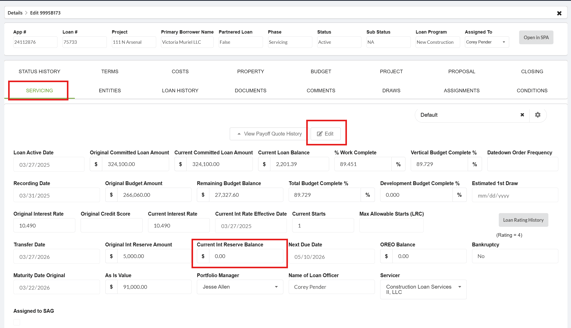
To update the Current Interest Reserve Balance:
From the LMS menu, go to:
-
Select Loans
-
Select Details
-
Locate and open Loan Details
-
Select Servicing Tab
-
Enable Super Powers
-
Select Edit
-
Update the Current Interest Reserve Balance field with the correct amount
-
Save and Close
Troubleshooting
- No 'save and close' button
- Verify that you've first selected 'edit' at the top of the Servicing tab
- Changes don't save:
-
- Verify that Super Powers are turned on.
Video Walkthrough: