Primary Department(s) Supported: Servicing
Super Powers Needed? – NO
Developer Support Needed – NO
Context and Common Situations
- Servicing notifies Product Support that a borrower no longer wants to make automatic ACH payments.
Important Considerations & Best Practices
- Disabling recurring ACH does not remove existing payment methods for draws—it only stops automatic drafts for loan payments made by the borrower.
Instructions:
To Turn Off Recurring ACH Payments:
From LMS Menu:
-
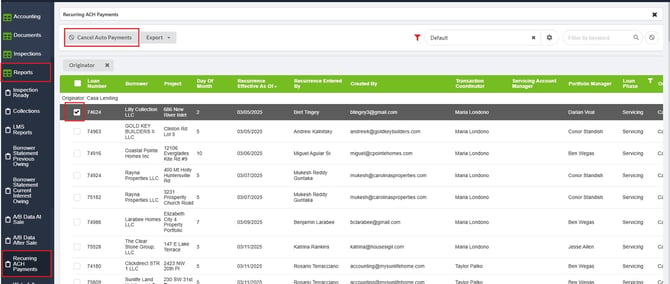
Select Reports
-
Select Recurring ACH Payments
-
Filter or Locate the loan number in the the table
-
Checkmark the box next to that loan
-
Click "Cancel Auto Payment"