
Primary Department Supported:
Product Support
Accounting / Treasury (LP Portal coordination)
Product Support
Accounting / Treasury (LP Portal coordination)
Description
This process outlines how to add a new Fund, create a new Loan Owner, and request LP Portal access when required.
This process outlines how to add a new Fund, create a new Loan Owner, and request LP Portal access when required.
New Fund Set Up / Add
I. Add New Fund Organization
- From the LMS Menu, navigate to: Organizations
- Verify the requested Fund does not already exist
- Click Add
- Select Organization Type: Fund
- Enter the following:
- Organization Name
- Internal Abbreviation (can be the same as the name)
- Type: Select Corporation
- Street Address:
- Use Puyallup headquarters address
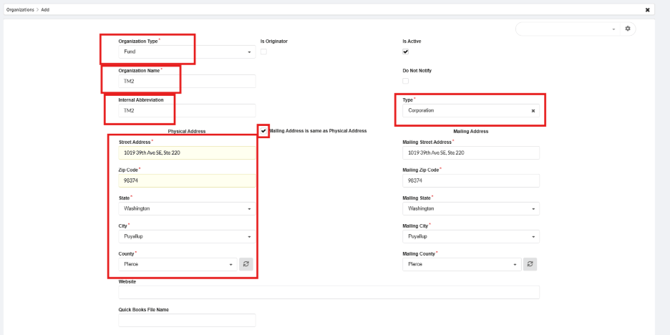
- Use Puyallup headquarters address
- Click Save & Close
New Loan Owner Set Up / Add
I. Add New Loan Owner Organization
- From the LMS Menu, navigate to: Organizations
- Verify the requested Loan Owner does not already exist
- Click Add
- Select Organization Type: Loan Company
- Enter the following:
- Organization Name
- Internal Abbreviation (can be the same as the name)
- Type: Select Corporation
- Street Address:
- Use Puyallup headquarters address
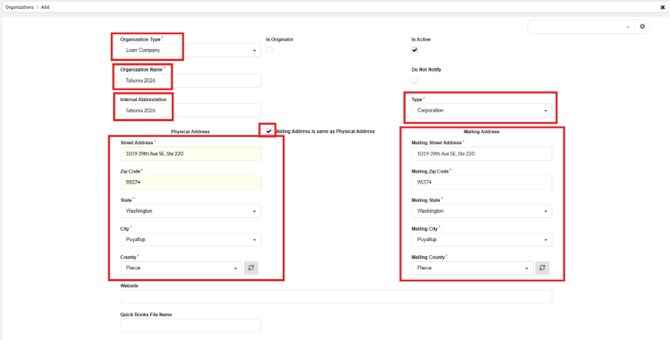
- Use Puyallup headquarters address
- Click Save & Close
LP Portal Set Up
Important Notes
- LP Portal setup requires an Asana task
- The task must be created and assigned to Salam
- Project: Finance / Treasury
- If the new ownership falls under Saluda grade since it’s an umbrella, we can assign to PS project vs treasury project in asana
Instructions
I. Confirm LP Portal Access Requirements
- Verify with Treasury whether the new facility requires LP Portal access
- If access is required, confirm the access type:
- View-only access (most common)
- Approval access for certain loan amendments (less common)
II. Create Asana Task
- Create an Asana task in the Finance / Treasury project
- Assign the task to Salam
- Include the following details:
- Fund name
- Loan Owner name
- LP Portal access type
- Date Treasury confirms the first loan sale will occur
Important Considerations
- Not all funds or ownership structures are modeled the same
- Treasury provides facility-specific details
- Be sure to clearly note any deviations or special requirements in the task
Title: New Fund CAST & Owner Castle 25 – LP Portal Setup
Description: As a business, we need to add a new capital owner, “Castle 25,” and a new Fund, “CAST,” into LMS so they can be assigned to loans.
The new facility will also require LP Portal access.
This setup can be modeled after the following existing facilities:
- BCSH Fund
- Shasta 2023
Status:
- Fund and Loan Company organizations have been added in LMS and are assignable to loans
LP Portal Requirements (AC1):
Given “Castle 25” is a capital partner
When a user from Castle 25 logs into the LP Portal
Then they should be able to:
Given “Castle 25” is a capital partner
When a user from Castle 25 logs into the LP Portal
Then they should be able to:
- View only the loans assigned to Castle 25
- Not edit or interact with loan data
- Access read-only features only
Final Notes
- Once the Fund Organization and Loan Owner are added, they will be assignable in LMS via fund assignments
- Accounting works directly with Salam to set up JE automation
- JE setup should ideally be completed prior to the first loan sale