
Monthly audit of loans closed in the previous month to confirm WIP transactions are posted, draws are created/funded, and each WIP transaction is linked to the correct draw.
Departments and Access
Department Supported - Product Support Audit
Super Powers Needed - NO
Dev Support Needed - NO
Context and Common Situations:
-
This is audit covers 2 sections of WIP
- Some loans will have conditions for WIP draws in the export but then will have no WIP listed at the budget tab level.
- Review the closing tab and if no WIP is listed on the closing tab either, WIP does not apply. The condition itself was marked as completed instead of waived.
Instructions:
1. Create a HubSpot ticket for the audit for tracking and external communication
-
Title of HS Ticket should include the Month and Title of the Audit
- Ex (July Monthly Audit - WIP Draws and Transactions)
2. Do an Export from the Loan Conditions in LMS to find all loans that should have a WIP
From LMS Menu:
-
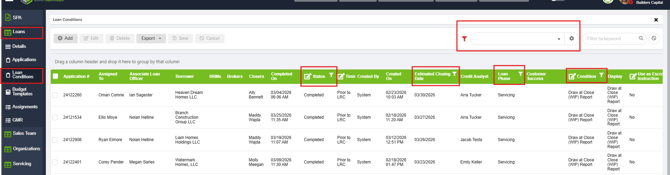
Select Loans > Loan Conditions
-
Clear out all pre-existing filters
-
Filter by:
-
Condition - "Draw at Close (WIP)
-
"Status - Is Not Equal to "Waived"
-
Loan Phase - "Servicing"
-
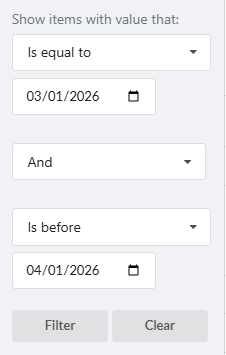
Estimated Closing Date - Is after or Equal to [The first day of the previous month] AND is Before [The first day of the current month]
-
-
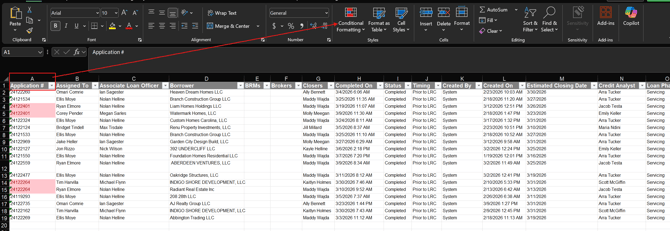
Export this list
-
Open the spreadsheet and filter the Application column to locate and remove any duplicate entries - This will be your final list of loans that need checked
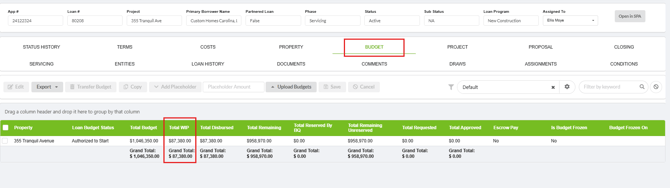
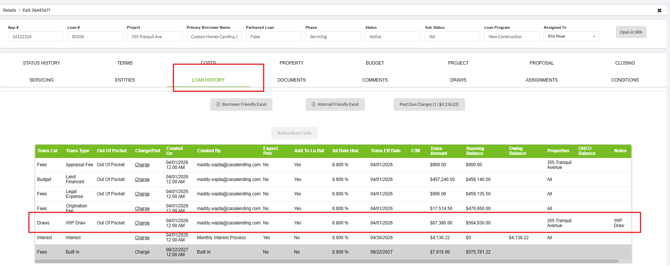
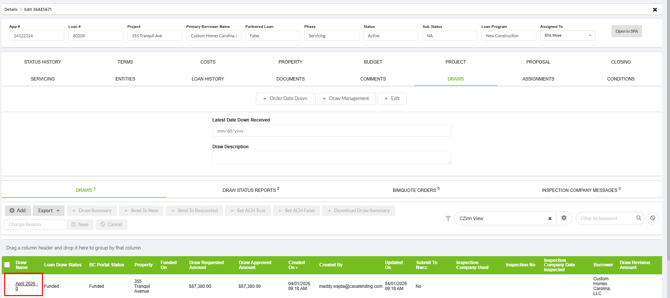
3. Using the Spreadsheet Review theLoan History, Budget Tab, and Draws Tab of each loan.
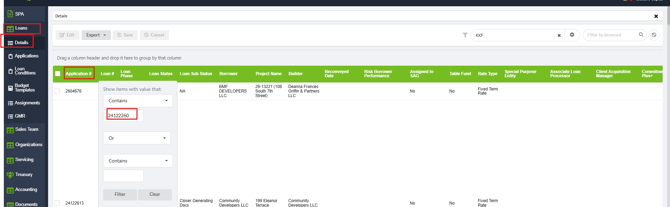
From your excel sheet - copy each application number and paste it into loan details to find each loan
- Review the Budget Tab and "Total WIP" column next to each property
- Go to the Loan History Tab - for each total WIP on the budget tab there should be a WIP Transaction
- Go to the Draws Tab - There should be a Draw for each WIP Transaction
IV. Ensure the WIP Transactions created in Previous month are Linked to Draws
Export a spreadsheet from Loan Transactions
From LMS Menu
-
Select Accounting >Loan Transactions
-
Filter by:
-
-
Transaction Type - "WIP"
-
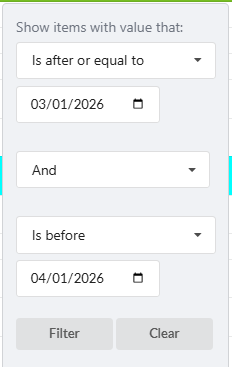
Effective Date - Is after or Equal to [The first day of the previous month] AND is Before [The first day of the current month]
-
3. Export this list or expand the LMS Table - and review the Loan Draw Column: There should be no blank entries. 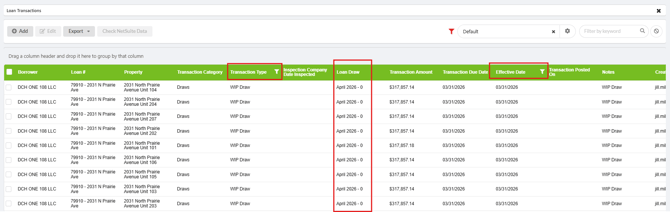
IV: Notate Results of Audit:
- Notate the Results of the audit in the log provided in this document – Include any relevant notes comments and links to tickets
- Post a verbal the confirmation of audit’s completion in the Teams Chat
- Resolve HubSpot Ticket
|
Date |
Results |
Tickets/Tasks/Resolution Notes |
Completed By |
| 06/01/26 | ALL WIP posted correctly | Ticket | DH |
| 7/1/26 | All WIP posted correctly | June Monthly Audit - WIPs | CS |
|
8/3/26 |
WIP posted Correctly |
CZ |
|
|
9/1/26 |
WIP posted correctly |
CZ |
|
|
|
|
|
|
|
|
|
|
|
|
|
|
|
|
|
|
|
|
|
|
|
|
|
|
|
|
|
|
|