
Primary Department Supported: Product Support
Description: Monthly audit of Interest Reserve Payments to verify all loans in servicing have the correct and most recent Interest Reserve Payments posted
Super Powers Needed? – NO
Developer Support Needed? - NO
Important Considerations & Best Practices:
-
If you find a payment that didn't post - Review the Conditions for IR Hold; This Condition Type prevents IR from being utilized. It's okay that the payment didn't post, and no action is needed; but for further clarity you could:
- Reach out to the PM or TC on each loan to confirm if this Hold has been completed and if it should be un-marked
-
For Loans with funds in their Current Interest Reserve and no payment has posted:
- Reach out to the PM or TC on each loan and loop in accounting through the HubSpot ticket created, Lisa K. and confirm that they want a payment posted with whatever is remaining.
-
If it is determined that the Interest Reserve Payment needs to be manually posted -
-
Submit a task to the developers to "Post Interest Reserve Payment and Link to Charge"
-
Instructions:
1. Start a HubSpot Ticket for Audit Tracking - Name this ticket with the previous month and the title of the Audit (ex. June Monthly Audit Posted IR Payments)
2. Pull the PMR Report:
- Reports
- LMS Reports
- Filter Locate the “Name” for Portfolio Management
- Select EXCEL
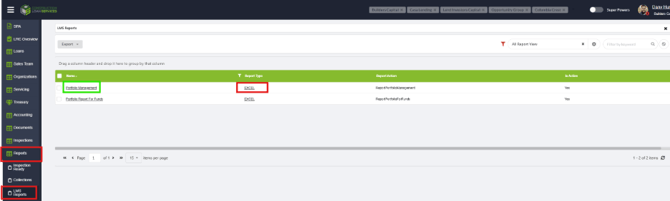
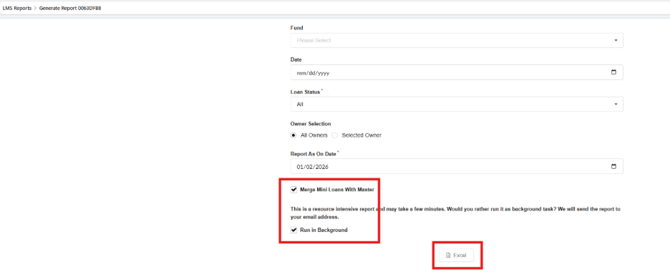
On the following screen select:
-
Report As on Date - "First Day of the Month"
-
Select "Merge Mini Loans into Master", and "Run in Background"
-
click Excel
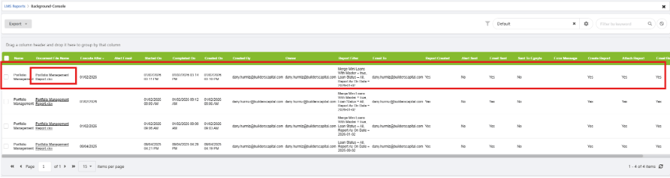
The next screen will have the generated Excel PMR Report.
NOTE: It will be blank until the file is generated, and an email will also be sent your email inbox with the report as well. Monitor/Refresh this table LMS and the document link will populate (can sometimes take 5+ minutes if it’s a big report).
Before:

After:
3. Open and Filter the Excel PMR Report:
Goal is to have a list of Interest Reserve Payments from previous months so those loans can be audited.
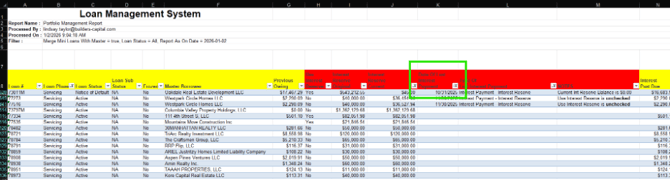
- Filter by
- “Loan Phase” IS Servicing (do not select Transferred Servicing)
- Date of Last Interest Payment (previous month)
- Type of last interest payment - Interest Payment - Interest Reserve
- Filter out loans that have current IR set to 0.00
- Reference the following columns:
- Use Interest Reserve: Filter to YES
- Interest Reserve Current: Should be greater than $10
- Look for and Pay attention to any loans that have a current IR balance, but a payment was NOT posted EOM
4. Notate Results of Audit:
- Notate the Results of the audit in the log provided in this document – Include any relevant notes comments and links to Asana Tasks and tickets
- Post a confirmation of audit’s completion in the Teams Chat
- Resolve the HS Ticket for the audit - include any and all relevant notes and screenshots
Validation and Troubleshooting:
- Check the Conditions tab for Open Interest Reserve Conditions
- There are some conditions that can be added that will Freeze IR payments. If the loan has this condition, it’s okay that it didn’t post and no action is needed
- If Use Interest Reserve is marked "NO" in the spreadsheet - confirm with Servicing if it should be enabled.
- Reach out to the PM or TC on each loan and include accounting through the HubSpot ticket created, Lisa K. and confirm that they want a payment posted with whatever is remaining.
AUDIT LOG – Notate the results of the audit here; include links to any ticket or tasks created
|
Date |
Results |
Tickets/Tasks/Resolution Notes |
Completed By |
|
03/02/26 |
|
|
CS |
|
4/6/26 |
|
|
CS |
|
5/1/26 |
no issues |
|
CS |
|
6/1 |
no issues |
|
cs |
|
7/1 |
no issues |
|
CZ |
|
8/1/26 |
Payments Posted |
|
CZ |
|
|
|
|
|
|
|
|
|
|
|
|
|
|
|
|
|
|
|
|