Primary Department Supported: Closing / Servicing / Processing
Description: How and when to use the Merge Organization feature in LMS
Super Powers Needed? NO
Developer Support Needed? NO
Common Situations
Organizations are merged when:
- A loan (or multiple loans) needs to be assigned to a specific borrower, particularly when a loan contains a placeholder borrower name, such as:
TBD [1234567891011] - There is an incomplete, incorrect, or true duplicate version of a borrower or other organization type
- Duplicate organizations often appear with a number in brackets:
Entity Name [1]
- Duplicate organizations often appear with a number in brackets:
Important Considerations & Best Practices
- Review loan status before merging:
- Do not merge to remove an organization if the name being removed is attached to active Servicing loans or Paid Off loans.
- After merging, any loan or contact previously associated with the old organization will now display the new organization.
- Confirm true duplicates:
- Validate with the requester whether the organization should be merged or if it should remain separate and simply be swapped on specific loans.
- When reviewing the Organization in LMS pay attention to what Originator it is associated with (Casa, Builders, Lend) – Copies/Duplicates are needed when Organizations utilized different originators for different loan deals
- Validate naming consistency:
- Clarify mismatches between the ticket and LMS data, such as commas or formatting differences (e.g. Entity Name LLC vs. Entity Name, LLC).
- Organization types must match:
- Only organizations of the same type can be merged (e.g., Borrower → Borrower, Builder → Builder).
Instructions:
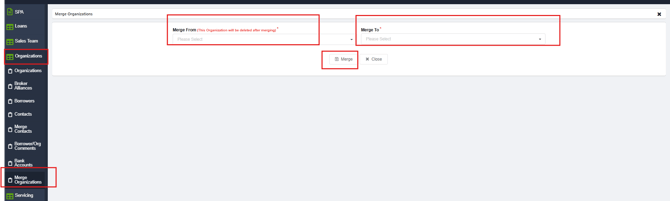
To Merge Organizations in LMSFrom the LMS Menu:
- Select Organizations → Merge Organizations
- Enter the Organization (Entity) being removed on the left
- Enter the Organization staying in LMS on the right
- Click Merge
Validation and Troubleshooting
- After merging it may take a few minutes for the changes to show in LMS
- Validate the merge was correct by searching for the Organization Name under the appropriate section (Organization/Borrower OR Organizations/Organizations)
- Validate merges of TBD Borrower names and duplicates by reviewing the loan Details or Entities Tab – Borrower Name should reflect the newly merged entity name.
- Organization cannot be merged due to type mismatch:
- Confirm both records are the same organization type; escalate to developers to update the record being removed into the same type needed
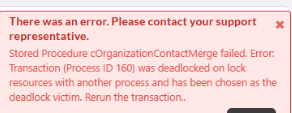
- Merge Error Messages
- Send a task to the developers to complete the merge
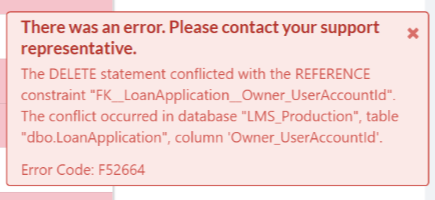
- Refresh and re-try the merge
- Send a task to the developers to complete the merge