
Primary Department Supported: Product Support Audit
Description: Monthly audit of interest charges. This audit verifies that all loans in servicing have interest charges posted for the current month
Super Powers Needed? – NO
Developer Support Needed? - NO
Instructions:
1: Create a HubSpot Ticket for the audit: Ticket Name should identify the month and the name of the audit
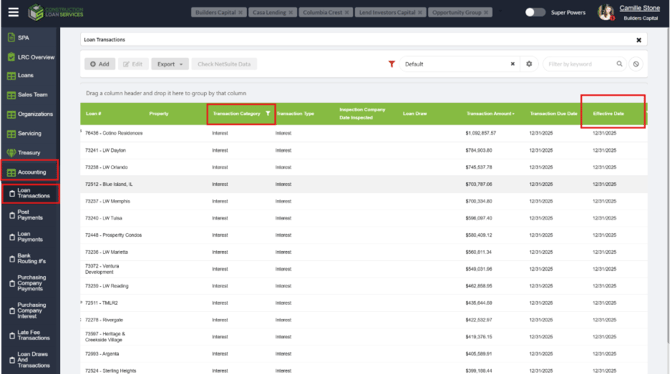
2. Export all the interest transactions posted:
From LMS Menu:
-
Select Accounting
-
Select Loan Transactions
-
Filter by Effective Date "last day of the month"
-
Filter by Transaction Category – "Interest"
- Ensure the Loan Phase column is selected
- Filter By Loan Phase IS Servicing
- Export to Excel
3. Export all the loans in Servicing
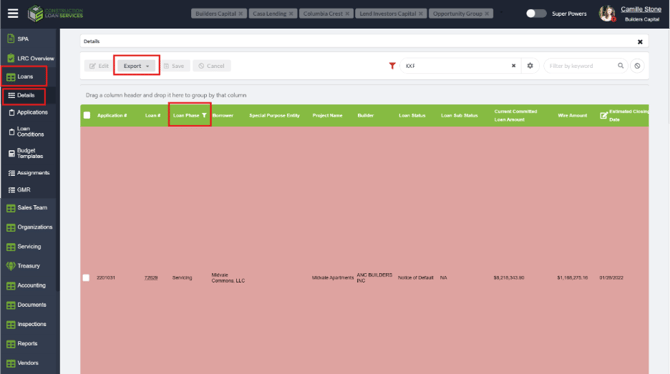
From LMS Menu:
-
Select Loans
-
Select Details
-
Filter by Loan Phase IS “Servicing”
- Add Loan Amount Current to the columns
-
Export to Excel
5. Filter the Loan Details Excel Sheet
- Open the Loan Details export and filter 'Loan Balance Current' to remove all loans with a negative or zero balance.
6. Combine information from both sheets and filter information
- Start a new Excel sheet/Tab or new workbook
- Using the spreadsheets you exported previously - Copy/paste the “Loan Number’ column from each sheet into new columns on your new workbook
- Tip: (Re-name the one that came from the transactions page as "transactions".
- In your new workbook:
- Split text to columns (ensure you're keeping any letters directly after the loan number) to ensure you're only comparing loan numbers
- Use Conditional formatting to highlight duplicates between the two columns
- Split text to columns (ensure you're keeping any letters directly after the loan number) to ensure you're only comparing loan numbers
-
- From the column exported from loan details, sort by fill color 'blank'
- this will leave any loan numbers unhighlighted that do not have an associated transaction in that column
- From the column exported from loan details, sort by fill color 'blank'
- Check the loan numbers against LMS to verify why interest transaction did not post
6. Notate Results of Audit:
- Notate the Results of the audit in the log provided in this document – Include any relevant notes comments and links to tickets
- Post a verbal the confirmation of audit’s completion in the Teams Chat
- Resolve HubSpot Ticket - Include all relevant screenshots and notes
Troubleshooting and Validation:
- For loans in production > lost, email accounting to determine if these charges should be removed or the loans moved back to servicing.
- Communicate to relevant department using the HubSpot ticket for tracking and validation.
- For loans paid off, navigate to loan history and determine if the loan was paid off during this month – if so, this interest is still valid and should be left. If the loan was previously paid off, work with accounting to determine if this charge is accurate.
- Loans with a negative or $0 balance will not accrue interest charges
AUDIT LOG – Notate the results of the audit here; include links to any ticket or tasks created
|
Date |
Results |
Tickets/Tasks/Resolution Notes |
Completed By |
|
03/02/26 |
No missing or extra charges |
N/A |
CZ |
|
4/2/26 |
|
|
CS |
| 5/1/26 | - no issues |
no issues |
CS |
|
6/1/26 |
no issues |
no issues |
CS |
|
7/1/26 |
no issus |
no issues |
CS |
|
8/1/26 |
no issues |
no issues |
CS |
|
10/1 |
no issues |
CZ |
|
|
|
|
|
|
|
|
|
|
|
|
|
|
|
|