
Primary Department Supported: Servicing
Super Powers Needed? – YES
Developer Support Needed? - NO
Context and Common Situations
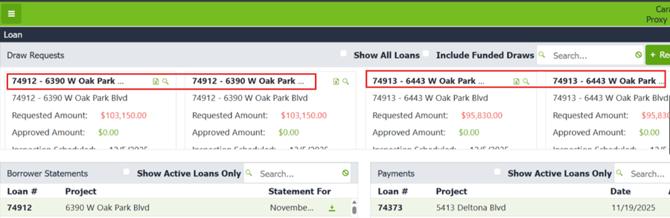
- A portal user will sometimes see multiple copies of the same loan or duplicates of the same draw in their borrower portal.
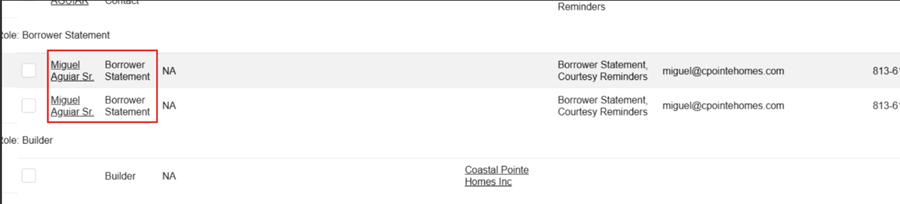
- This typically occurs when the user has duplicate role entries on the Entities Tab, such as multiple copies of:
- Borrower Statement
- Courtesy Reminders
- Guarantor
- Draw duplicates may also result from extra or erroneous draws that were not properly voided in LMS.
Important Considerations & Best Practices
- Always verify the issue directly by proxying into the user’s portal before making changes.
- Transaction Coordinators/Draw Management specialists can void draws; While Product Support can also void draws, PS should confirm with servicing before proceeding on their behalf.
Instructions:
Review Borrower Portal for Current View- Proxy into the user’s portal
- Confirm that duplicate versions of the draw are still visible
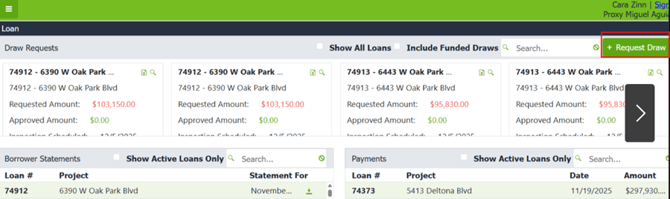
- Navigate to Request Draw button
- Check the Loan dropdown: multiple copies of the same loan appear, this indicates a duplicate LMS roles
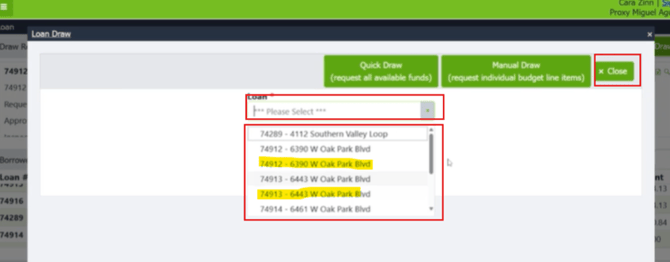
Review the Draws Tab in LMS
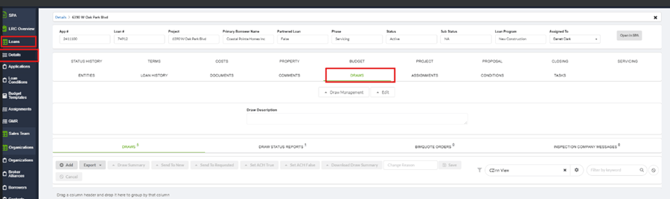
From LMS Menu:
- Select Loans → Loan Details → Draws
- Verify the number of draws listed for the loan
- Identify any extra or erroneous draws
- Request the Transaction Coordinator to void incorrect or duplicated draws/ get permission from TC and void draw
Review the Entities Tab
From LMS Menu:
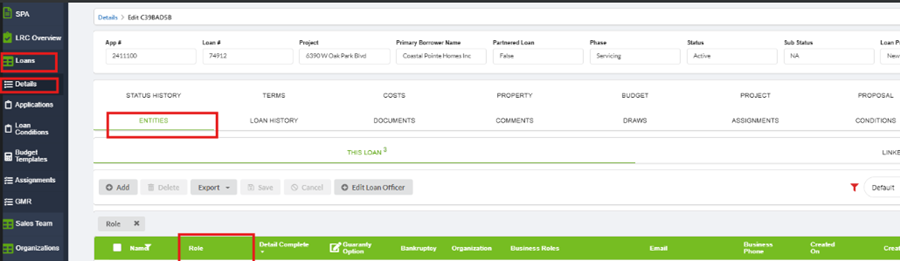
- Select Loans → Loan Details → Entities
- Locate the portal user on the Entities table.
- Look for duplicate entries under the following roles:
- Borrower Statement
- Courtesy Reminders
- Guarantor
- Remove duplicates as follows:
- For Borrower Statement: Checkmark the duplicate entry → Delete.
- For Courtesy Reminders: Checkmark the duplicate entry → Delete.
- For Guarantor: Enable Super Powers then checkmark the duplicate entry → Delete
Validation and Troubleshooting:
Validate the duplicate portal entries are removed:
- Proxy into the user’s portal again and the duplicate versions should no longer be visible
If Duplicates still appear:
- Confirm the duplicate roles were fully removed from each affected loan number
- Ensure all erroneous draws were voided