Primary Department Supported: Servicing · NWM Support/ Servicing
Super Powers Needed? -NO
Developer Support Needed? - NO
Context and Common Situations
Servicing or NWM Support reports that a document within an inspection order needs to be removed.
In rare cases, a Returned inspection may contain an incorrect PDF that must be replaced.
Important Considerations & Best Practices
- Documents can only be deleted when the inspection is in “Requested” status.
- Once the inspection is Returned, it is normally locked and no deletion is allowed.
- Ensure that any replacement documentation is obtained from NWM before re-uploading.
- Verify the correct Inspection Number before making any changes to avoid altering the wrong order.
Instructions:
To Delete a document on a Requested Inspection
- From LMS Menu:
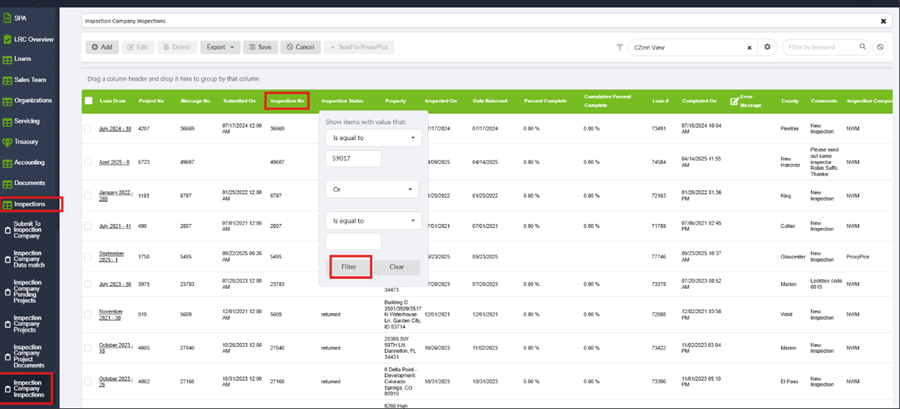
- Select Inspections
- Select Inspection Company Inspections.
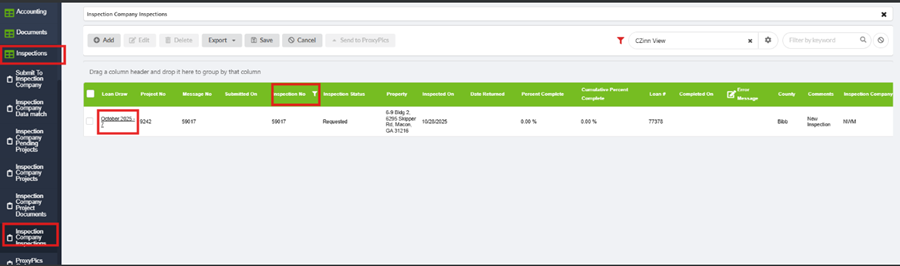
- Filter by Inspection Number.
- Click to open Details.
- Open the Documents tab in the details
- Check the box next to the document(s) that need removed.
- Click Delete.