Primary Department Supported: Servicing/Closing/Processing
Super Powers Needed? – YES
Developer Support Needed? - NO
Context and Common Situations
Product Support is often asked to help remove guarantors from a loan on the Entities Tab after the loan has reached a certain status or is in stages prior to closing that users are no longer able to modify
Types of requests include:
- Removing duplicate versions of the same guarantor
- Removing guarantors no longer needed on the loan
Important Considerations & Best Practices
- Is Loan Status in LRC Voting? – Must go through voting and into the next stage before PS can make any adjustments
- Loans MUST have at least 1 Guarantor listed – PS or Servicing may need ADD a guarantor BEFORE LMS will allow the existing one to be deleted
- Authorized Third Parties should not be added to the loan on the Entities Tab with the role as a Guarantor – Authorized Third Parties will only be associated with the term “Guarantor” at the User Account level for their portal
Instructions:
To Delete or Remove Guarantor From Loan
From LMS Menu:
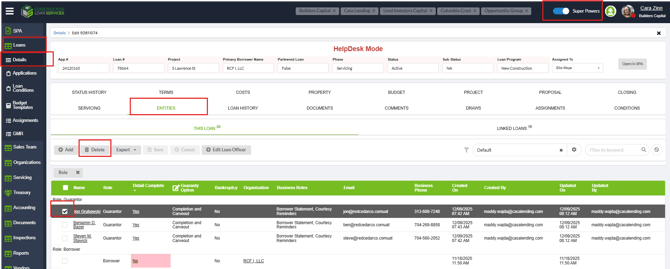
- Select Loans
- Select Loan Details
- Loan Details
- Locate Loan number and open details
- Select Entities
- Turn on Super-Powers
- Checkmark box next to Guarantor
- Click Delete